
How to Build a Social Media Content Calendar That You Can Actually Keep
Build a social media content calendar that creators, agencies, and small teams can actually maintain, with a 7-day example and PostTempo workflow.
A social media content calendar is a simple operating system for what you will publish, where it will go, when it should go live, and who needs to approve it. The best calendar is not the one with the most columns. It is the one your team can actually keep using after the first busy week hits.
Free tool
Find your best posting time
Get a personalized weekly plan in about 60 seconds. No signup needed to see your schedule.
Try the free plannerFor creators, agencies, and small teams, the goal is not to plan every post forever. The goal is to remove the Monday morning blank page, protect your best posting windows, and make publishing feel repeatable. A usable calendar turns scattered ideas into scheduled posts, keeps platform differences visible, and gives you enough structure to stay consistent without turning content into admin work.
If your current calendar is empty, overbuilt, or ignored, rebuild it around the next seven days first.
Start With Publishing Capacity, Not Content Ideas
The fastest way to build a calendar you can keep is to start with capacity. Ask a boring question first: how many quality posts can you create, review, and publish this week without panic?
For a solo creator, that might be three core posts and lightweight stories. For a small brand team, it might be five posts across LinkedIn, Instagram, and Threads. For an agency, it might be three approved posts per client, with one backup post in reserve.
Do not start by copying a daily posting schedule from a benchmark report. Daily posting can work, but only when the workflow can support it. Consistency is not the same as volume.
For example, a creator might choose Instagram as the primary platform, LinkedIn as the support platform, and five total posts: two Reels, one carousel, one LinkedIn post, and one flexible short update. That is small enough to keep and specific enough to execute.
PostTempo fits this stage by keeping the plan close to the publishing queue. Instead of writing ideas in one tool and rebuilding them later in another scheduler, the calendar can move from idea to draft to scheduled post without losing context.
- Choose one primary platform for the week.
- Choose one or two support platforms.
- Pick the number of posts you can finish before the publish day.
- Reserve at least one open slot for reactive content or a delayed approval.
Define Your Calendar Columns
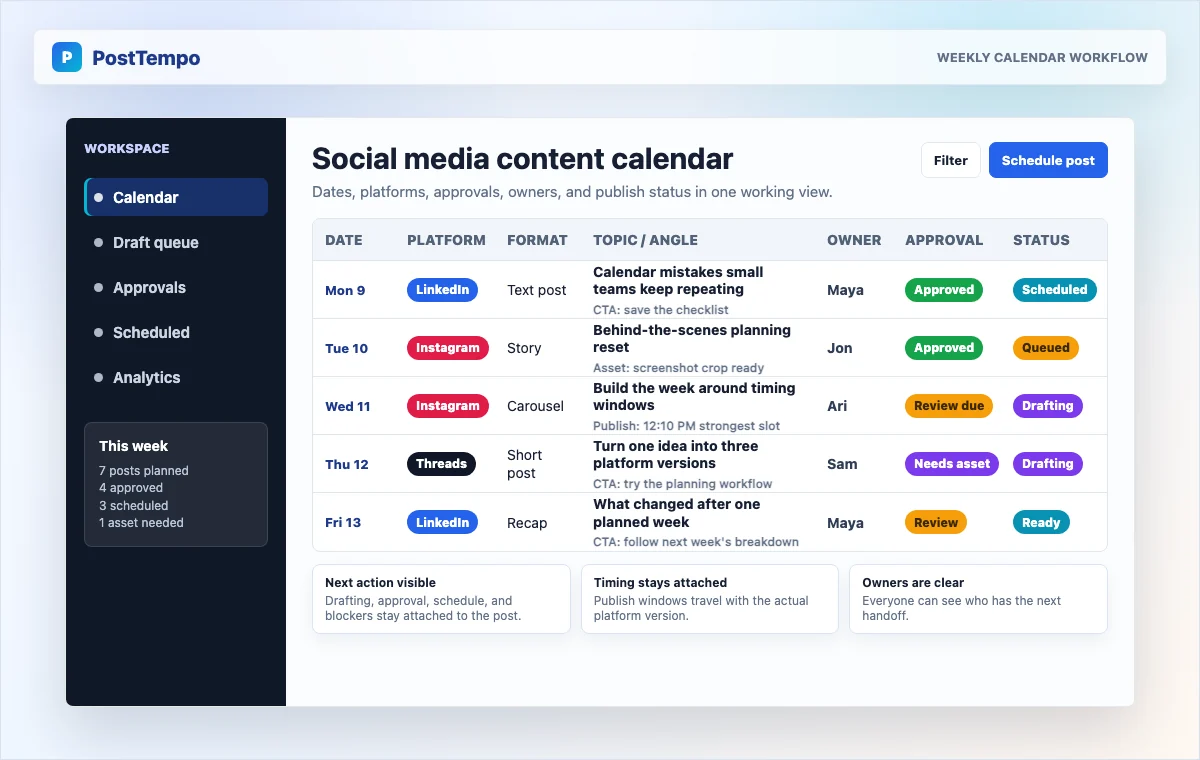
A usable social media content calendar needs just enough fields to prevent confusion.
The important fields are status fields. A calendar without status is just a list of hopes. Use plain labels: idea, drafting, needs asset, ready for review, approved, scheduled, published, repurpose later.
For agencies, add client, reviewer, approval due date, and usage notes. For creators, add filming needed, editing needed, and repurpose target.
Keep the CTA field explicit. Every post does not need to sell, but every post should have a job: comment, save, subscribe, read the blog, try the tool, join the waitlist, book a call, or compare pricing.
This is also where internal linking strategy belongs for blog-led teams. If a weekly article supports a social post, put the article URL in the calendar.
- Publish date
- Publish time
- Platform
- Format
- Topic or angle
- Draft status
- Owner
- Approval status
- Asset status
- CTA or next step
- Notes
References and related guides
Build the Week Around Themes and Timing Windows
A social media content calendar becomes easier to maintain when each day has a purpose. Themes reduce decision fatigue.
You do not need cute theme names. You need useful operating rules.
Then layer timing on top. If Instagram is part of the week, use your own account data when possible. If you do not have enough data yet, start with external benchmarks and test.
The mistake is separating content planning from timing. A strong carousel should not land in a leftover slot because the calendar was full. Put your most important post into your strongest likely window. Use weaker or experimental windows for lower-risk posts.
Protect production time. If a post is scheduled for Wednesday noon, the draft should not be due Wednesday morning. Build the calendar backward. That backward planning is the difference between a real calendar and a decorative one.
- Monday: teach the core idea.
- Tuesday: show an example.
- Wednesday: publish the highest-value post in a strong timing window.
- Thursday: share proof, process, or customer-facing insight.
- Friday: recap, repurpose, or invite conversation.
- Weekend: optional light content if your audience is active.
- Publish Wednesday noon, approval due Tuesday noon, asset due Monday afternoon, draft due Monday morning.
References and related guides
A Practical 7-Day Creator Calendar Example
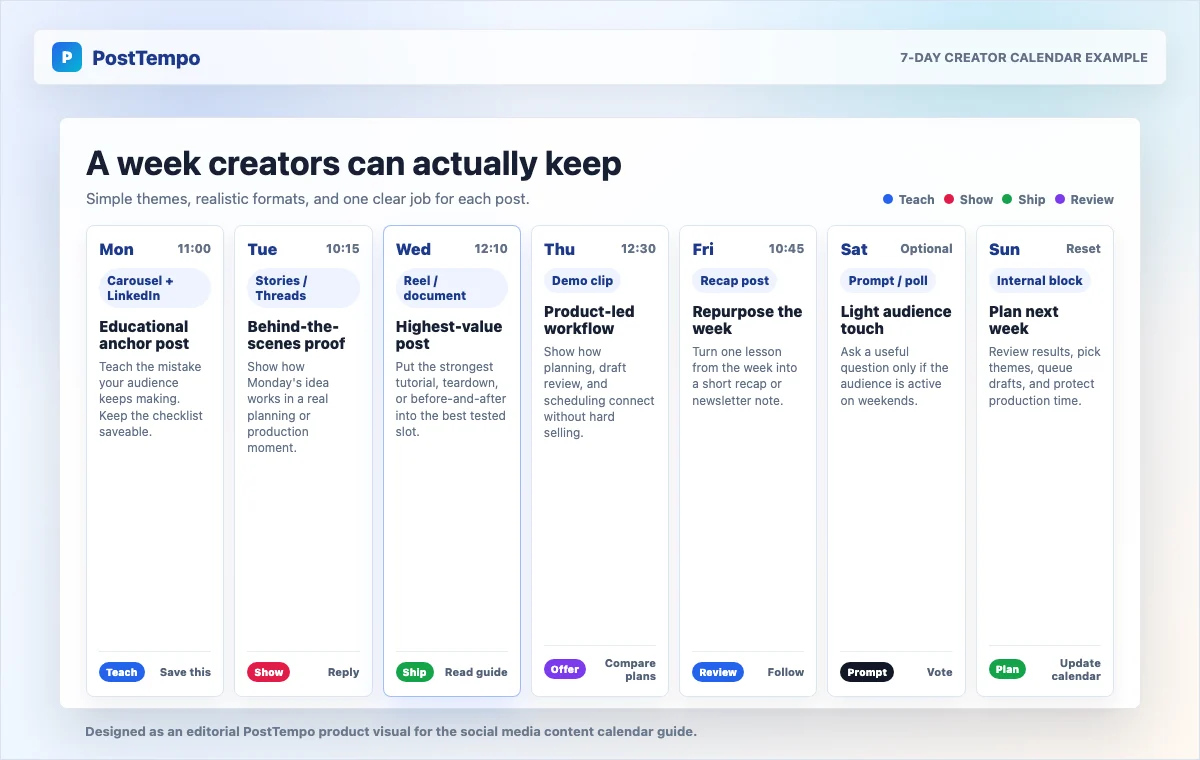
Here is a simple weekly calendar a solo creator, small brand, or agency client could keep.
Monday is the educational anchor post: a LinkedIn and Instagram carousel that teaches the mistake your audience keeps making, published late morning or around lunch, with a save-this-checklist CTA and a draft ready by Sunday night.
Tuesday is behind-the-scenes proof: a short update, screenshot, process note, or client-safe lesson that shows how the Monday idea works in practice. It does not need to be polished. It should make the theme feel real.
Wednesday is the highest-value post: an Instagram Reel, LinkedIn document post, tutorial, teardown, or before-and-after. Put your best post in your best window, and make sure it is approved by Tuesday noon.
Thursday is product-led or offer-aware: a short explanation, demo clip, or feature walkthrough that shows how you solve the planning problem. Product-led does not mean hard selling every day. It means showing the workflow clearly enough that the right reader sees the next step.
Friday is recap and repurpose: a weekly recap, lesson list, or what-worked post that turns one lesson from the week into another asset.
Saturday is optional light content: a casual prompt, poll, or personal process note if your audience is active on weekends.
Sunday is the planning reset. Review what published, what missed, what can be repurposed, and what deserves a stronger slot next week.
Use a Review Loop, Not a Perfect Calendar
The point of a social media content calendar is not to predict everything. It is to make learning visible.
Review the calendar once a week. Do not only look at likes. Track the signals that match the post's job.
Then make one adjustment at a time. Move a post type to a better time. Change the CTA. Split one broad idea into a tighter series. Kill a platform that is eating effort without returning signal.
Agencies should review by client and by workflow. If posts perform well but approvals arrive late, the issue is operations. If a creator has strong ideas but weak consistency, the issue may be batching and scheduling.
PostTempo's role is to keep the plan, schedule, and publish state together so the team is not reconstructing the week from a spreadsheet, notes app, message thread, and native scheduler.
- Saves for educational posts
- Shares for useful frameworks
- Comments for conversation posts
- Clicks for traffic posts
- Profile visits for discovery posts
- Replies for relationship-building posts
- Trials, demos, or pricing visits for product-led posts
Where PostTempo Fits in the Calendar Workflow
PostTempo is built for teams that want content planning and scheduling in one practical path.
Most calendar problems are handoff problems. The idea lives in one place, the asset in another, the approval in a message thread, and the final post in a native scheduler.
Creators can use PostTempo to keep their publishing rhythm clean. Agencies can make client calendars less fragile. Small teams can connect content strategy with the actual publishing queue.
The message is not post more. It is make the week easier to keep.
- Choose the week's publishing capacity.
- Add posts to the calendar by platform and format.
- Use timing guidance to protect stronger publish windows.
- Draft platform-specific versions instead of forcing one caption everywhere.
- Review assets, captions, and approvals before a post enters the queue.
- Schedule the post.
- Review results and adjust the next week.
References and related guides
Sources
Weekly Rhythm Report
One chart. One tactic. Every Sunday.
The best posting window of the week, one platform breakdown, and one growth tactic. Read in 90 seconds.
No spam. Unsubscribe anytime.