
Free Social Media Account Handoff Checklist
Free checklist to hand off social accounts: owners, access, queued posts, assets, and sign-off. Download it with no email.
Social media account handoff checklist
Hand off a social account by naming the owner, checking the incoming login, listing queued posts, moving approved assets, and recording sign-off before the next publish window.
- Name the outgoing lead, incoming lead, and organizational owner.
- Inventory native accounts, scheduler connections, and recovery owners.
- Record queued posts, timezones, approvals, and unresolved failures.
- Transfer approved media, usage rights, brand notes, and reporting context.
- Test the incoming person’s access using a draft before signing off.
- Document acceptance, remove outgoing access, and verify the next publishing window.
No signup required. Open in a text editor or paste into your team document.
Set up the approval workflow before handing over the weekly posting schedule.

A social media account handoff is the controlled transfer of account authority, publishing work, media, decisions, and operating context from one person or team to another. A good handoff leaves the incoming owner able to work, the organization able to recover access, the outgoing owner removed at the right time, and the content calendar in a known state.
Free tool
Find your best posting time
Get a personalized weekly plan in about 60 seconds. No signup needed to see your schedule.
Try the free plannerA password message is not a handoff. It may expose a personal login, omit recovery details, leave former staff connected, and tell the incoming person nothing about queued posts, campaign promises, media permissions, approval status, or failures. The safer goal is role-based access through each platform, a written inventory, a verified calendar, and a signed acceptance record.
This guide is for beginners and experienced teams. It covers a creator delegating work, an agency returning an account, and a brand moving between partners. The named scenarios are realistic fictional composites created for instruction. They are not customers, testimonials, performance claims, or proprietary PostTempo data.
Set Scope, Owners, and Acceptance Rules First
Write a one-page handoff brief before changing access. Name the accounts, business portfolios, channels, regions, client workspaces, advertising assets, schedulers, media libraries, analytics sources, and date range in scope. List exclusions too. If paid media, community moderation, direct messages, creator contracts, or customer support are handled elsewhere, identify those owners rather than assuming the social lead controls them.
Assign four roles for the transfer. The outgoing lead explains current state and resolves known gaps. The incoming lead receives access and performs acceptance tests. The organizational owner authorizes material changes and decides disputed ownership. The verification owner records the evidence and confirms offboarding. One person can hold more than one role on a small team, but each responsibility should still be explicit.
Define acceptance in observable terms. Examples include opening the business portfolio through the incoming person's own account, viewing the correct Page, creating a draft, uploading approved test media, requesting approval, seeing the calendar in the expected timezone, locating a failed post, viewing the documented analytics fields, and confirming recovery contact ownership. Do not accept the handoff because an invitation email was sent.
Assumption example: a seven-day transfer window may work for a small creator with two channels and one scheduler. It may be too short for a regulated brand, several regions, multiple agencies, paid assets, complex contracts, or unavailable approvers. State the assumed scope, staff availability, and risk level before estimating time.
- One written scope with included and excluded systems
- One authorized decision-maker for ownership disputes
- One incoming lead who performs the tests personally
- One evidence location for invitations, decisions, and verification
- One dated acceptance checklist that must pass before offboarding
References and related guides
Freeze Surprises and Create a Change Log
Choose a short stabilization window. During that window, route new publishing changes through the handoff owner. This does not always mean stopping all posts. It means preventing undocumented edits to access, schedules, media, offers, links, campaign status, or account settings while the inventory is being verified.
Create a change log with timestamp, system, account, requested change, requester, approver, implementer, result, and verification link or screenshot location. Record canceled posts, changed times, updated captions, replaced media, role invitations, accepted invitations, revoked access, token reconnections, and unresolved errors. A chat message can notify the team, but the durable record should live with the handoff package.
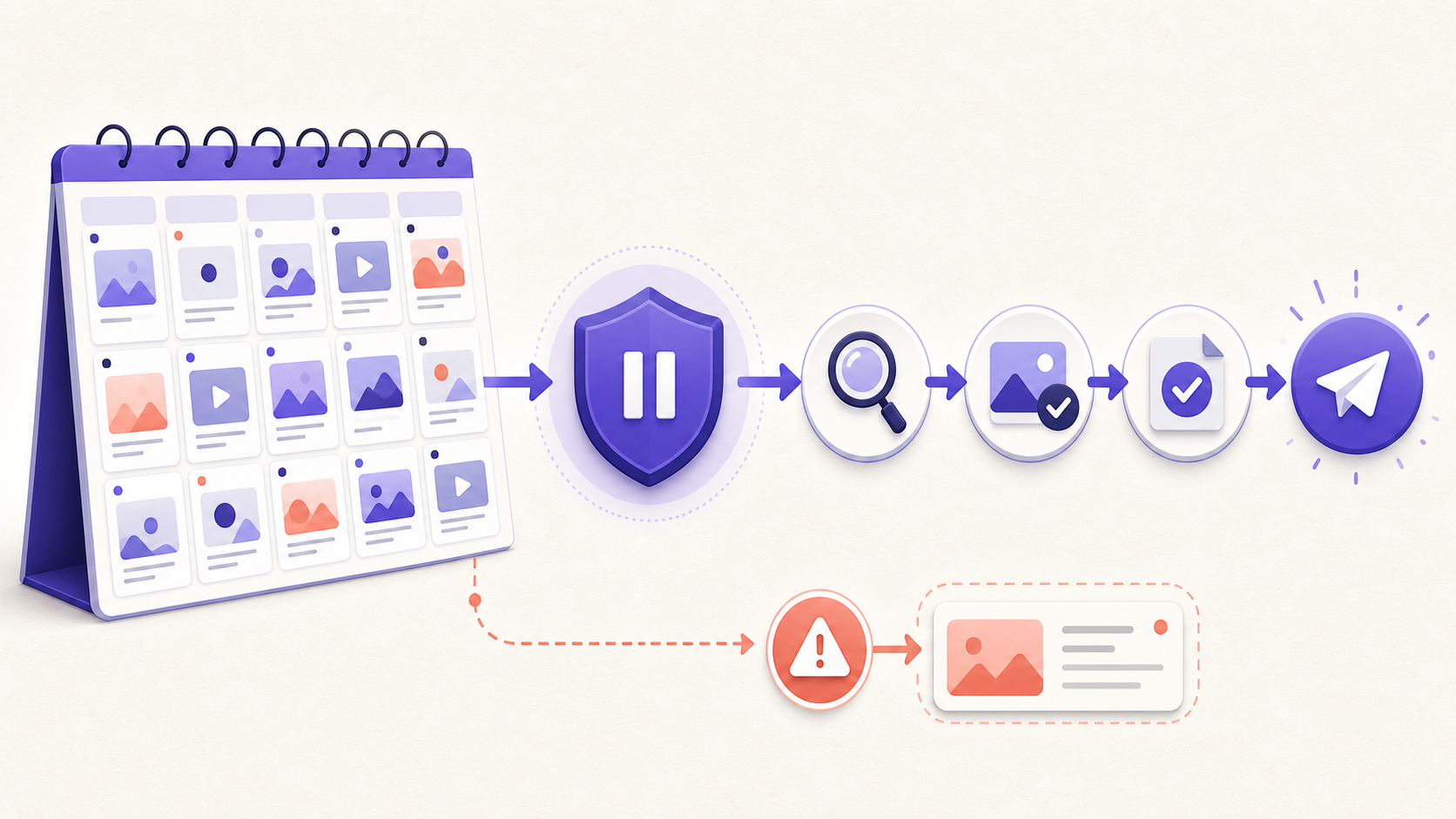
Use a pause rule for high-risk situations. Pause the affected queue when ownership is disputed, a recovery channel is controlled by a departing person, media permission is missing, a sponsored disclosure cannot be confirmed, an offer is no longer valid, a scheduled post depends on a launch that moved, or an account shows suspicious access. Pausing one affected lane is usually better than blindly canceling every channel.
If the transition reveals a suspected compromise or harmful live post, switch to the incident process. Preserve evidence, restrict changes to authorized responders, and use the crisis plan. A routine handoff checklist should not become an improvised security investigation.
References and related guides
Build the Account and Asset Inventory
Inventory every public account and the systems around it. For each social presence, record the public URL, handle, platform identifier when available, organizational owner, business portfolio or brand account, primary administrators, assigned roles, connected scheduler, advertising account, catalog or commerce connection, linked website, recovery contact, and current operating status. Mark Unknown when evidence is missing.
Next inventory supporting assets. Include content calendars, draft libraries, approved media, original source files, brand templates, caption banks, campaign briefs, rights evidence, talent releases, music licenses, partner instructions, link destinations, tracking conventions, analytics exports, response scripts, escalation contacts, and archived decisions. A folder name is not enough. Identify who controls it and whether the incoming team can open the files.
Separate platform authority from tool access. Someone may be able to schedule through a connected application without being able to manage the underlying Page or channel. Another person may be a platform administrator but lack access to the current draft calendar. Record both paths and test them independently.
Use stable identifiers when possible. Handles, display names, and campaign labels can change. A platform account identifier, internal workspace identifier, post identifier, media identifier, and public URL help the next team reconcile records. Do not put passwords, backup codes, private tokens, or secret keys into the ordinary inventory. Store sensitive material only in the organization's approved secret-management process.
- Public identity: URL, handle, display name, platform identifier, region, and status
- Authority: organizational owner, business container, administrators, and recovery owner
- Publishing: scheduler workspace, connected account, timezone, queue, and approval route
- Assets: source media, working files, rights evidence, templates, links, and brand guidance
- Measurement: analytics source, export date, field definitions, and reporting owner
- Exceptions: missing evidence, disputed ownership, expired access, failures, and open support cases
Transfer Role-Based Access Without Sharing Passwords
Prefer each person's own identity with the narrowest role that supports the work. Current platform documentation reflects this model. LinkedIn says Page roles are assigned to individual member profiles and that a super admin can add Page or paid media administrators. YouTube says channel permissions let multiple people manage a channel without access to the underlying account sign-in. Meta documents Facebook access and task access for Pages. TikTok Business Center separates Admin and Standard roles and supports account or asset-level permissions.
Sourced fact: role names and capabilities differ across platforms. A role called Manager on one channel is not equivalent to a manager role elsewhere. Read the current permission table for the exact asset, then map the job requirement to the smallest supported role. Confirm whether the role covers organic publishing, messages, analytics, advertising, billing, catalogs, or user management before granting it.
NIST describes least privilege as allowing only the access needed for assigned tasks and reviewing privileges so unnecessary access can be reassigned or removed. CISA's identity and access guidance similarly recommends limiting user account permissions to what a person needs for the job. These are general security references, not platform-specific transfer instructions.
Use an add, test, then remove sequence. First, an authorized current administrator invites the incoming person. Second, the incoming person accepts through their own identity and performs the required tasks. Third, the verification owner records the role and test result. Only then should the outgoing person's access be reduced or removed, unless immediate removal is required for security, legal, or employment reasons.
Never require a departing worker to surrender a personal social profile. Transfer the organization's Page, channel, business container, media, and records using supported administrative paths. If the organization cannot identify an authorized current administrator, stop guessing and use the platform's documented recovery or access-request process.

Protect Recovery, Connected Apps, and Sensitive Credentials
Recovery is part of ownership. Confirm which organization-controlled email address, phone number, domain, business verification, recovery contact, and authentication method supports each account. Personal recovery channels create a fragile dependency even when daily role access looks correct. Do not replace working recovery details until an authorized owner understands the consequence and the new channel has been verified.
Inventory connected applications and integrations, including schedulers, automation tools, analytics services, link tools, media libraries, advertising partners, commerce systems, and old test applications. Record the business purpose, owner, permission scope, last verified date, and planned disposition. Remove an unfamiliar connection only after identifying whether it supports current publishing or measurement, unless security response requires immediate containment.
Rotate shared or organization-controlled credentials when policy or the transition requires it. Use the organization's approved password manager or secret store. Never paste secrets into the article checklist, content calendar, ordinary spreadsheet, ticket, or chat transcript. Backup codes and recovery keys deserve the same protection as passwords.
Editorial recommendation: schedule a second access review after the transition. Some permissions become visible only after invitations settle, integrations refresh, or people try real tasks. The follow-up interval should reflect the organization's risk and staffing, not an invented universal standard.
- Verify organization-controlled recovery email and phone ownership
- Confirm authentication and backup-code custody without copying secrets into the inventory
- List connected applications, scopes, owners, and last verification dates
- Rotate shared credentials through an approved secret-management process
- Schedule a post-handoff access review and record removals
References and related guides
Reconcile the Calendar, Queue, Approvals, and Failures
Take a dated snapshot of the next publishing window. For each item, record account, platform, scheduled time and timezone, campaign, content owner, approver, caption status, media status, destination link, disclosure status, and current publishing state. Review drafts, scheduled items, approval requests, currently publishing items, retries, and failures. A calendar card is not proof that a post will publish.
Compare four views: the handoff inventory, the scheduler calendar, the platform's native scheduled content when available, and the live account. Resolve duplicates, missing targets, timezone shifts, canceled launches, expired offers, unavailable media, incomplete approvals, disconnected accounts, and failed attempts. Record the decision for every exception.
Product observation: PostTempo implements separate draft, approval-related, scheduled, publishing, published, and failed states, along with calendar, queue, approval, retry, and account-reconnection behavior. Its media preflight code checks descriptors before publishing and its interfaces surface work needing attention. Those first-hand product observations inform the recommendation to transfer visible state and failure context rather than handing over only future dates.
Product limitation: a successful local validation or scheduler state cannot guarantee that a platform will accept a future post. Tokens expire, platform rules change, media processing can fail, and native review can intervene. Keep an owner for post-handoff monitoring and define who responds when the first scheduled items do not behave as expected.
References and related guides
Transfer Media Rights, Disclosures, and Brand Context
Move source files and the evidence that explains how they may be used. For each important photo, video, illustration, audio track, quote, testimonial, creator asset, or partner contribution, record the source, owner, license or permission, allowed accounts and regions, approved edits, credit requirements, campaign term, expiration, and evidence location. File possession does not prove reuse permission.
Transfer the disclosure decision with sponsored and endorsement content. FTC staff guidance says a material connection to a brand should be obvious and the disclosure should be hard to miss and placed with the endorsement. For queued work, verify the relationship, wording, media placement, language, platform tool, and approver. Other countries and regulated sectors may impose additional rules, so local professional review may be needed.
Capture brand context that cannot be inferred from a template. Include approved product names, current offers, prohibited claims, sensitive topics, response boundaries, regional differences, accessibility conventions, link destinations, crisis contacts, and examples of accepted and rejected work. Label editorial preferences as preferences rather than platform rules.
Check media in the exact versions that will publish. The original source may be licensed and accessible while the cropped, captioned, translated, or music-backed version is not. Confirm alt text or equivalent descriptions, captions, contrast, readable on-screen disclosures, and source records for the final asset.
- Rights record for every reusable third-party or contributor asset
- Disclosure decision attached to the actual post and media version
- Current offers, product facts, claims, and source links
- Accessibility elements for the final platform version
- Escalation contacts for legal, compliance, privacy, rights, and crisis questions
References and related guides
Capture an Analytics Baseline Without False Precision
Export or record a baseline before responsibilities change. Include the source platform, account, date range, export time, timezone when known, original field names, and person who obtained the data. Keep the raw export unchanged and create a separate working summary. This allows the incoming team to distinguish a platform record from later interpretation.
Do not promise that the incoming team will reproduce every historical number. Platforms revise definitions, attribution, privacy thresholds, retention, and interfaces. A metric shown today may be recalculated or unavailable later. Document what was available and what was not rather than filling gaps with zero.
Calculation example: suppose a team transfers twelve queued posts across three accounts. The review estimate assumes eight minutes per post for caption, link, media, disclosure, approval, and schedule checks, plus twenty minutes per account for role and recovery verification. The arithmetic is twelve times eight minutes, plus three times twenty minutes, for 156 minutes. That is an internal planning estimate, not a universal benchmark or PostTempo performance statistic.
Separate the evidence types. Sourced fact is a value in a named first-party export. Calculation is a formula using documented inputs. Assumption is the transfer window, workload, or expected availability. Product observation describes behavior the PostTempo team builds and tests. Editorial opinion is a recommended sequence or decision rule. Keeping these labels prevents an estimate from becoming a claimed industry standard.
References and related guides
Scenario One: Maya Chen Adds a Part-Time Content Manager
Maya Chen is a fictional independent food creator. She publishes on three channels, keeps source video in a shared drive, and has two sponsored posts planned next month. She hires Devon Reed for ten hours a week to prepare drafts, organize media, and schedule approved work. Maya remains the account and commercial decision owner.
Maya first lists each channel, its business or channel container, the scheduler connection, recovery owner, current roles, and queued posts. She grants Devon a role that supports content work without transferring user management or recovery control where the platform allows it. They test a draft, media upload, schedule change, and analytics view through Devon's identity.
The handoff catches two gaps. One sponsor brief lives only in Maya's email, and a video draft uses music with no recorded reuse terms. Maya stores the approved brief with the campaign and puts the video on Hold pending evidence. She does not describe the missing license as probably fine.
Acceptance is narrow and observable: Devon can reach the right accounts, locate approved assets, prepare a draft, request Maya's approval, see the calendar timezone, and identify the two sponsored disclosure requirements. Maya keeps recovery ownership and schedules a role review after the first campaign cycle.
Scenario Three: Redwood Kitchens Changes Agency Partners
Redwood Kitchens is a fictional multi-location brand moving from one agency to another while a seasonal product campaign is active. The outgoing agency owns working files, the brand owns the accounts and final creative, and the incoming agency needs publishing and analytics access. Regional offer terms differ.
The brand creates one inventory for organizational ownership and separate rows for each regional account, ad asset, catalog connection, scheduler workspace, recovery channel, and campaign folder. The incoming agency receives the narrow roles needed for organic publishing and reporting. Broader billing and user-management access stays with named brand employees.
During calendar reconciliation, the incoming team finds three posts using a nationwide caption for an offer available in only two regions. Those items move to Hold. The team keeps the original files, records the limitation, creates approved regional versions, and sends them through the normal review path. No engagement forecast is invented to justify the correction.
Redwood runs acceptance in a staging-style manner using drafts and approved test media, then monitors the first live campaign posts. The outgoing agency is removed only after the brand verifies native roles, connected applications, file access, regional instructions, and the escalation tree. Contracts and ownership disputes remain matters for authorized legal and commercial reviewers.
Run Acceptance Tests Before Removing Old Access
Acceptance is a task test, not a meeting. The incoming owner should sign in through their own identity, reach every in-scope account, confirm the assigned role, locate source media, create a draft, attach approved test media, inspect the preview, request or record approval, view the calendar timezone, find a queued item, identify a failed or held item, and open the agreed analytics source. Use nonpublic drafts where a live test is unnecessary.
Verify recovery and authority separately. The organizational owner should confirm that recovery contacts, business verification, primary administrators, connected applications, domains, and support paths are controlled by the right people. The incoming content manager does not need to receive every recovery secret to prove organizational control.
After acceptance, remove or reduce outgoing roles in the native platforms, business containers, scheduler, media library, analytics tools, link tools, project systems, and connected applications. Rotate shared credentials when required. Save evidence of the final state, but do not copy secrets into the evidence package.
Monitor the first real publishing window. Confirm that posts move through expected states, media loads, links reach the intended destination, disclosures remain visible, and failures have an owner. Record exceptions and close them. A signed checklist with unresolved high-risk items should say Conditional or Not Accepted, not Complete.
Product experience note: the PostTempo Editorial Team builds and tests social scheduling, media validation, approval, calendar, queue, retry, account connection, and publishing workflows. That work provides first-hand insight into where transfers lose context. It does not make the team a platform authority, cybersecurity assessor, lawyer, or owner of a proprietary cross-customer handoff dataset.
- Incoming person completes task tests through their own identity
- Organizational owner verifies recovery and primary administration
- Outgoing native roles and tool access are removed or reduced
- Required shared credentials are rotated through an approved process
- First real publishing window is monitored and exceptions are closed
- Final status is Complete, Conditional, or Not Accepted with evidence

References and related guides
A Beginner-Friendly Seven-Day Handoff Plan
Day one: write the scope, roles, acceptance tests, stabilization window, pause rules, and evidence location. Identify the authorized organizational owner. List exclusions and high-consequence issues that require specialist review.
Day two: inventory accounts, business containers, current administrators, scheduler connections, recovery channels, connected applications, content folders, analytics sources, and open support cases. Mark Unknown instead of guessing.
Day three: snapshot drafts, scheduled posts, approval requests, active campaigns, failures, retries, links, media, and disclosures. Reconcile the scheduler with native platform views and live accounts. Pause only affected lanes when evidence or ownership is unclear.
Day four: invite incoming people with the narrowest current roles that support their jobs. Transfer approved files, decision history, brand context, rights evidence, disclosures, source claims, and escalation contacts. Keep secrets in the approved secret-management process.
Day five: run incoming task tests and record results. Resolve missing permissions, wrong accounts, timezone issues, inaccessible files, unresolved approvals, and failed connections. Do not remove the final working administrator merely to meet the schedule.
Day six: obtain acceptance from the incoming lead and organizational owner. Remove or reduce outgoing access across platforms and tools, rotate required shared credentials, review connected applications, and record the final state.
Day seven: monitor the next publishing window, verify live outcomes, close exceptions, store the handoff package, and schedule a follow-up access review. If material issues remain, label the transfer Conditional or Not Accepted and keep owners and due dates visible.
- Scope before access changes
- Inventory before assumptions
- Queue review before publication
- Add and test before routine removal
- Evidence before acceptance
- Monitoring after the transfer
Editorial Methodology and Professional Limits
Methodology: we inventoried PostTempo's blog registry, SEO registry, comparison pages, route map, blog hub, sitemap inputs, prior automation history, and existing live intents. We selected an informational account-handoff intent because it does not replace the content audit, calendar guide, pre-publication checklist, crisis plan, approval-workflow page, timing pages, or scheduler comparisons.
We inspected implemented account connection, scheduling, media validation, approval, calendar, queue, retry, analytics, and publishing-status behavior for first-hand product observations. We researched current primary sources from Meta, LinkedIn, TikTok, and YouTube for platform access, NIST and CISA for least privilege and identity access practices, and the FTC for endorsement disclosures.
Sourced facts are linked near the claims and listed below. The workload arithmetic shows its inputs. Named scenarios and time windows are explicit instructional assumptions. Product observations describe repository behavior available to the Editorial Team. Recommendations such as the five-layer handoff, stabilization window, add-test-remove sequence, and acceptance labels are editorial opinions that teams should adapt.
The named creator, agency, and brand examples are fictional composites. They are not testimonials, customer evidence, or performance statistics. Platform interfaces, roles, access limits, recovery processes, tokens, data availability, and policies are volatile. Confirm current instructions with the platform. Use a qualified local professional for legal ownership, contracts, employment, privacy, security incidents, advertising, intellectual property, record retention, regulated claims, and other high-consequence decisions.
Frequently Asked Questions
What should be included in a social media account handoff?
Include organizational ownership, platform and tool access, recovery control, account and asset inventory, drafts and scheduled posts, approvals and failures, source media, rights and disclosures, brand context, analytics baselines, open issues, acceptance tests, outgoing-access removal, and follow-up verification.
Should a team share social media passwords during a handoff?
Prefer supported role-based access through each person's own identity. If an organization controls a shared credential that must be changed, rotate it through the approved password or secret-management process. Do not put passwords, tokens, or backup codes in the ordinary checklist, calendar, email, or chat.
When should the outgoing social media manager lose access?
For a routine transition, add and test the incoming access, record acceptance, then remove or reduce outgoing roles. Security, legal, contractual, or employment circumstances may require immediate removal, so the authorized organizational owner and qualified professionals should decide high-risk cases.
How should queued posts be handled during an agency change?
Take a dated snapshot, compare the scheduler with native platform views and live accounts, and verify account, time, timezone, caption, media, link, disclosure, approval, and state for each item. Pause affected posts when ownership, rights, offers, launch timing, or access is uncertain.
Who owns a brand's social media account after a handoff?
Operational access does not by itself establish legal ownership. Verify the organization, business container, contracts, platform records, and authorized decision-makers. Use the platform's documented recovery or access process and qualified legal advice when ownership is disputed.
How do you know a social media handoff is complete?
The incoming owner completes observable task tests through their own identity, the organizational owner verifies recovery and administration, required evidence is accessible, old access is removed or reduced, the first publishing window is monitored, and all material exceptions are closed or explicitly accepted with owners and dates.
Sources
- Meta Help Center: Give, Edit or Remove Facebook Page Access
- LinkedIn Help: Add Admins on Your LinkedIn Page
- TikTok Business Center: Roles and Permissions
- YouTube Help: Add or Remove Channel Access
- NIST SP 800-171 Revision 3: Account Management and Least Privilege
- CISA: Identity and Access Management Recommended Best Practices
- Federal Trade Commission: Disclosures 101 for Social Media Influencers
Weekly Rhythm Report
One chart. One tactic. Every Sunday.
The best posting window of the week, one platform breakdown, and one growth tactic. Read in 90 seconds.
No spam. Unsubscribe anytime.