
Social Media Content Review Checklist: What to Check Before Publishing
Use this practical social media content review checklist to verify facts, brand voice, disclosures, accessibility, account access, approval, and scheduling before a post goes live.

A social media content review checklist is the set of questions a team answers before a post moves from draft to publication. It verifies the message, facts, media, disclosure, accessibility, destination account, approval, and timing. The checklist belongs inside a wider approval workflow, but its search intent is different: this guide focuses on what to inspect, not on comparing approval software.
Free tool
Find your best posting time
Get a personalized weekly plan in about 60 seconds. No signup needed to see your schedule.
Try the free plannerThe goal is not to add meetings. The goal is to prevent invisible handoffs. A creator should know what information belongs in the draft. A reviewer should know what to check. An approver should see the final version, not an old attachment. A publisher should be able to verify that approval still applies to the version in the queue.
This guide gives you a practical system you can start with a small team and adapt as your accounts, clients, or compliance needs grow. The named examples are realistic composite scenarios created for instruction. They are not testimonials, customer claims, or promises of results.
Start With Four Clear Roles
The creator turns the brief into platform-ready copy and media. The reviewer checks the work against the brief and leaves specific feedback. The approver accepts the final version or sends it back. The publisher confirms the account, format, time, and approval state before scheduling or publishing. One person can hold more than one role on a small team, but the role change should still be explicit.
For example, a solo consultant may be both creator and publisher while a client remains the approver. An agency account manager may review a designer's draft, route it to the client, then publish only after the client approves. A regulated organization may require separate brand, legal, and compliance reviewers before an authorized publisher can act.
Use access that matches the job. NIST defines least privilege as restricting user access to the minimum necessary to perform assigned tasks. In practice, an analyst who only needs reports should not automatically receive the ability to remove administrators or publish posts. A client reviewer should not need a shared platform password just to accept copy.
Keep a backup administrator for business continuity, but do not solve continuity by giving full control to everyone. TikTok's current Business Center security guidance recommends limiting admin access, keeping at least two administrators to avoid loss of access, reviewing access regularly, removing inactive users, and granting the minimum needed access.

References and related guides
Use One Status Path From Brief to Publication
Begin with a brief, then move the post through Draft, In Review, Changes Requested when needed, Approved, Scheduled, and Published. If a post fails during publishing, move it to a visible Fix Needed state rather than silently returning it to Draft. Status should describe the post, not the mood of the team.
The most important transition is from Approved to Scheduled. Approval should apply to a specific version. If someone edits the caption, media, destination link, disclosure, account, or material timing after approval, return the post to review. Minor typo policies can be defined in advance, but “minor” should not include a changed claim, offer, or disclosure.
Comments should stay attached to the current post record. Feedback scattered across email, direct messages, documents, and screenshots creates version confusion. A reviewer may approve one image while the publisher unknowingly schedules another. Keeping the draft, media, comments, decision, and queue status together reduces that risk.
Set a clear outcome for every review: Approved, Changes Requested, or Rejected. Avoid ambiguous comments such as “looks okay” when the system expects a final decision. A complete decision includes the reviewer, time, version, and any conditions that must remain true.
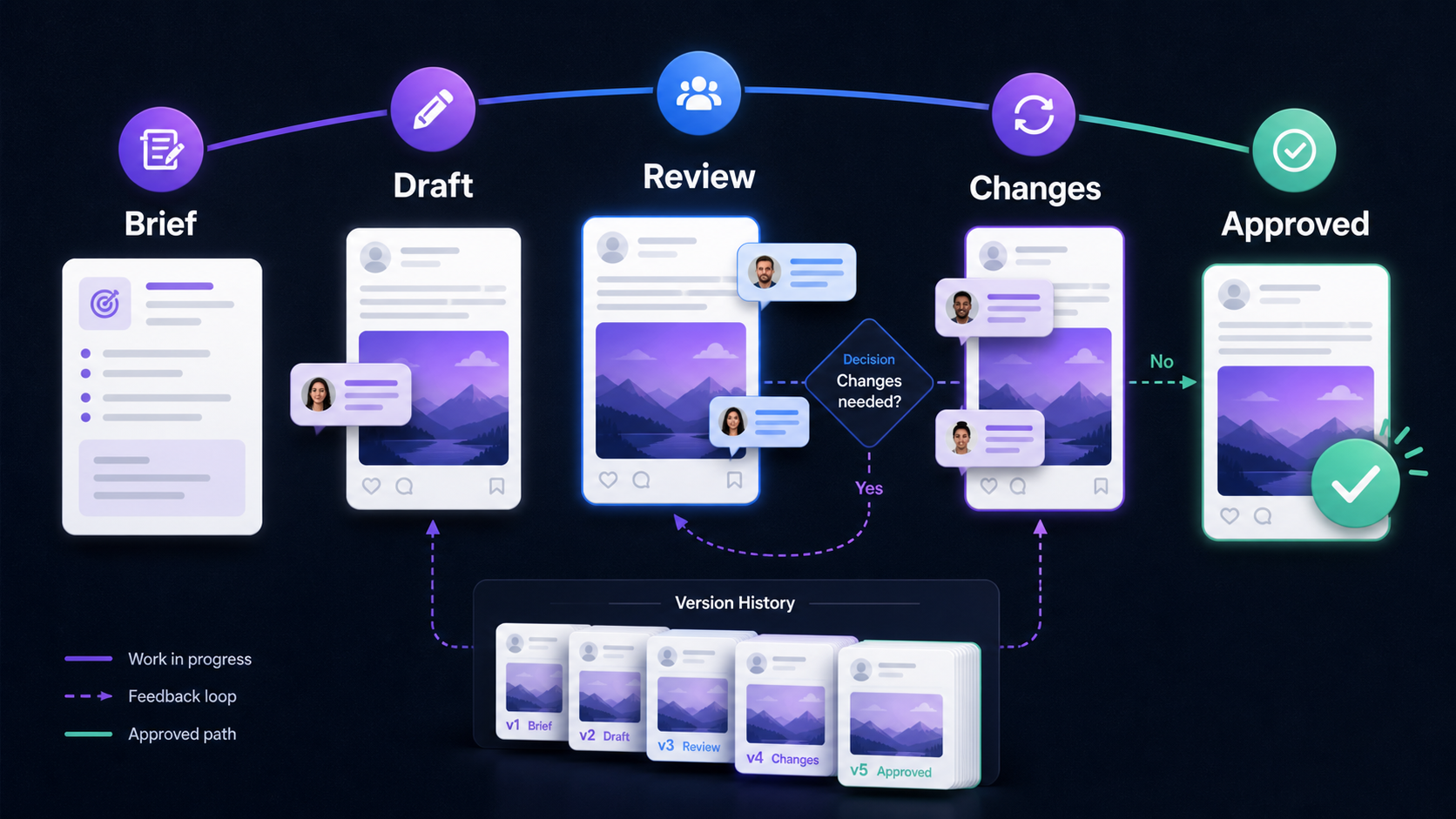
References and related guides
Make the Brief Easy to Approve
A reviewer cannot approve what the team has not defined. Give each post a compact brief before writing. Include the audience, objective, key message, required facts, offer terms, destination link, platform, format, media requirements, brand constraints, disclosure needs, and desired publication window.
Separate facts from assumptions. A fact is something the team has verified, such as an approved product price or an event date. A calculation is a result derived from named inputs, such as the deadline example later in this guide. An assumption is a planning choice that may change, such as expecting a client to answer within one business day. An opinion is a recommendation, such as preferring one final approver instead of a committee.
Add source notes beside claims. If the caption says a product has a feature, link the approved product page or internal specification. If it names a deadline, identify the current campaign brief. If it uses a customer quote, record permission and the exact approved wording. The reviewer should not have to search for evidence in another system.
Finally, define the non-goals. A launch post may be intended to announce availability, not explain every feature. A short video may be designed for awareness, not direct sales. Clear boundaries help reviewers judge the actual post instead of expanding the assignment during review.
- Audience and desired action
- Verified message, claim sources, and current offer terms
- Platform, format, account, media, and accessibility needs
- Disclosure or approval requirements
- Owner, reviewer, approver, and final decision time
References and related guides
Put Brand, Disclosure, and Access Checks Near the Post
A checklist is useful only when the reviewer sees it at the right moment. Put the brand, factual, legal, accessibility, and account checks beside the final draft. Do not rely on a policy document that nobody opens during a rushed approval.
For sponsored or endorsed content aimed at United States consumers, FTC staff guidance says a material connection to a brand should be obvious. It also says the disclosure should be hard to miss, placed with the endorsement message, and written in simple, clear language. A workflow should therefore make the disclosure a visible approval item, not a note hidden below the caption or left for the publisher to remember.
Check the destination account and the person's access separately. Platform roles can be broad. LinkedIn content admins can create and manage Page content, while super admins have every Page admin permission, including adding or removing admins. TikTok Business Center Admins have full system access, while Standard members work on assigned accounts and assets. Match the platform role to the work, then use your editorial approval to control the post decision.
Common review items include spelling, names, dates, prices, link destinations, media rights, alt text or captions, safe-area placement, disclosure, account selection, and timing. For medical, financial, legal, political, employment, or regulated claims, involve a qualified local professional instead of expecting a general marketing reviewer to resolve the issue.
References and related guides
Scenario One: Maya Chen and a Sponsored Launch
Maya Chen is an illustrative independent fitness creator preparing a sponsored launch for a reusable bottle. Her brief identifies the sponsor, the product she actually received, the approved talking points, the destination link, the required disclosure, and the planned short-video format. Maya creates the first draft and records the media source and music choice.
Her manager reviews tone, factual statements, spelling, and whether the disclosure is visible in the caption and video. The sponsor's contact approves the product claims and offer dates. Maya remains the publisher because the post appears on her account and reflects her experience. If the sponsor requests a new performance claim, Maya does not simply paste it in. The claim returns to review with supporting material and, where appropriate, professional guidance.
The workflow protects Maya's voice as well as the sponsor's requirements. Approval does not mean the sponsor can replace her honest opinion. FTC guidance states that an endorser cannot describe an experience with a product they have not tried or claim a bad product was terrific because they were paid.
Assumption: the sponsor usually replies within one business day. Limitation: the actual agreement controls deadlines, usage rights, and cancellation terms. Maya should ask counsel about unclear contract or advertising obligations rather than treating a workflow template as legal advice.
References and related guides
Scenario Two: Northline Studio and Client Review
Northline Studio is an illustrative five-person agency managing a restaurant group's monthly calendar. The strategist owns the brief, a copywriter and designer create the draft, the account manager performs the first review, and one client marketing lead gives final approval. The publisher schedules only the approved version to the named location account.
Northline previously gathered feedback in separate email chains. In the improved workflow, the account manager consolidates internal feedback before inviting the client to review. The client sees one version and chooses Approved or Changes Requested. If two client stakeholders disagree, the named marketing lead resolves the conflict instead of asking the agency to guess which message wins.
The agency sets a review cutoff in the statement of work. Missing the cutoff does not silently equal approval. Instead, the post moves to Hold, the account manager alerts the client, and the calendar is adjusted. That choice protects both sides from an accidental publication, although the contract may define a different rule.
Observed product evidence: PostTempo's implemented approval workflow stores pending and decided requests and supports Approved, Rejected, and Changes Requested outcomes. Its team interface also describes a client role as review and approve only. Those controls informed this example. They do not guarantee that every agency process or platform permission will match this exact design.
References and related guides
Scenario Three: Rafael Ortiz and Local Accuracy
Rafael Ortiz is an illustrative social lead for a home-services brand with eight local branches. A central team creates a seasonal storm-preparation campaign, but local managers must verify service areas, phone numbers, opening hours, and weather relevance. Rafael does not give every local reviewer full control of every account.
The central creator makes a reusable master draft. Each branch receives a localized copy with the account, location details, media, and publish window already identified. A local reviewer confirms only the facts they own. Rafael approves brand consistency, and an authorized publisher schedules the approved version for each branch.
When one branch changes its weekend hours after approval, only that branch's post returns to Changes Requested. The other approved versions continue. This is why approval should attach to a version and destination account rather than to a broad campaign name.
Assumption: local managers can verify their details before the cutoff. Observed fact: platform business tools offer scoped roles or assigned assets, but the exact role names and capabilities differ. Editorial opinion: keep the central brand decision and local factual decision separate. Limitation: emergency communication, licensing statements, and local advertising rules may require a different chain and advice from qualified local professionals.
References and related guides
Calculate a Realistic Approval Deadline
Work backward from the publish time. Do not ask for approval “as soon as possible” when the queue needs a concrete cutoff. Use the actual time required for each step, then add a buffer that reflects the risk and the reviewer's working hours.
Worked calculation: assume a post is scheduled for Friday at 3:00 p.m. local time. Publishing preparation needs 30 minutes. A final verification needs 30 minutes. One revision round needs 2 working hours. The approver needs 4 working hours to respond. Add a 2-hour buffer for interruptions. The calculation is 0.5 + 0.5 + 2 + 4 + 2 = 9 working hours. If the team works eight-hour days, the final approval request should arrive no later than Thursday morning, not Friday at lunch.
This is a planning calculation, not an observed performance statistic. Change every input to match your team. A simple text post with one approver may need less time. A regulated campaign, translated video, paid promotion, or client committee may need several days. Record the assumption so the team can improve it after real projects.
Editorial opinion: set two times, not one. The review due time tells the approver when to decide. The publish cutoff tells the publisher when an unresolved post must be held. This removes the temptation to treat silence as permission.
- Publish preparation: 0.5 working hour
- Final verification: 0.5 working hour
- Expected revision: 2 working hours
- Approver response window: 4 working hours
- Interruption buffer: 2 working hours
- Total planning allowance: 9 working hours
What We Observed in the PostTempo Workflow
For this guide, the PostTempo Editorial Team reviewed the implemented product flow rather than describing an imagined roadmap. Posts can exist as drafts and move through queue states that include needs approval, approved, scheduled, publishing, published, and fix-needed conditions. The dedicated approvals view separates pending requests from past decisions.
A reviewer can make one of three explicit decisions: approve, request changes, or reject. The approval record includes the related post, reviewer context, request message, status, and timestamps. The team interface describes roles as controls over who can edit posts, manage accounts, and approve client work. These are workflow observations, not claims that the product replaces contracts, platform permissions, or professional review.
The product evidence supports a practical lesson: a scheduler should preserve the decision state next to the post and make exceptions visible. It should not hide failed publishing, changed content, or unresolved approval inside a general calendar. A visible queue helps the owner focus on the next action.
Provider-neutral assistance can help summarize a long approval request or prepare a draft, but the final decision remains human. Teams should check generated text against the brief and sources. Do not let faster drafting collapse the review path, especially when a post includes sponsored claims, sensitive facts, or account-specific details.
References and related guides
Create an Exception Path Before You Need It
An ordinary approval path is not enough. Define what happens when a scheduled post becomes inaccurate, an account is compromised, a sensitive event changes the context, or a live post needs correction. The exception path should be shorter than the normal path but more explicit, not less.
Use five actions: Pause, Assess, Correct, Reapprove, Publish. Pause queued posts that may share the same issue. Identify the current owner and the factual or security concern. Correct the specific version while preserving the audit history. Ask the designated emergency approver to review the change. Publish or resume only after the new decision is recorded.
If the account itself may be compromised, stop treating the problem as an editorial correction. Follow the platform's recovery process, remove suspicious access, rotate relevant credentials through approved security procedures, and involve the person responsible for security. TikTok's Business Center guidance recommends reviewing access, monitoring unauthorized changes, and removing inactive users. Your organization may need a broader incident-response process.
Decide in advance who can pause a queue, who can remove a live post, who communicates with clients, and who documents what happened. In high-risk situations, consult counsel, compliance, security, or another qualified professional. Speed matters, but an undocumented emergency edit can create a second problem.

References and related guides
A Beginner-Friendly Implementation Checklist
Start with one recurring campaign, not every account at once. Map the people who already create, check, approve, and publish. Choose one final approver and a backup. Write the status definitions in plain language. Put the next campaign through the path, then review where the handoffs failed.
Create a brief template with required facts and sources. Decide which edits invalidate approval. Set review due times and a hold rule for missed deadlines. Give each person the minimum platform and workspace access required for their role. Require individual accounts rather than shared passwords where the platform supports them, and enable appropriate account security controls.
During the first month, inspect a small sample of published posts. Check whether approval was attached to the final version, whether requested changes were resolved, whether the destination account was correct, and whether the queue recorded failures clearly. Do not manufacture a success metric. Record the facts you can observe, such as the number of late decisions or version mismatches, then improve the process.
Keep the workflow proportionate. A routine community update may need one reviewer. A sponsored product claim may need the creator, sponsor, and disclosure check. A regulated announcement may require formal professional review. The process should become more careful as the consequences increase.
- Name the creator, reviewer, approver, publisher, and backups.
- Define Draft, In Review, Changes Requested, Approved, Scheduled, Published, and Fix Needed.
- Attach feedback and decisions to one current version.
- Place claim sources, disclosure checks, media rights, and destination details beside the post.
- Work backward to set the review deadline and publish cutoff.
- Return material edits to review after approval.
- Review access regularly and remove people who no longer need it.
- Document the pause and correction path for urgent exceptions.
References and related guides
Editorial Methodology and Professional Limits
Methodology: we inspected the current PostTempo code paths and interface language for drafts, approval requests, decision states, team roles, scheduling, and publishing status. We then compared the operational recommendations with current official guidance from LinkedIn, TikTok for Business, the Federal Trade Commission, and the National Institute of Standards and Technology. Sources are linked beside relevant claims and listed below.
We used three composite scenarios to demonstrate the workflow across a creator sponsorship, an agency-client relationship, and a multi-location brand. The people and organization are fictional. The examples are not customer stories and contain no claimed performance results. The deadline example is a transparent calculation based on stated assumptions, not a benchmark.
The PostTempo Editorial Team writes and reviews product-workflow guides because the team works directly with the planning, drafting, approval, queue, and publishing-status features described here. We do not claim legal, compliance, cybersecurity, or platform credentials. Platform documentation and product behavior can change, so readers should verify permissions in their current account.
Consult qualified local professionals when a post involves legal rights, regulated claims, employment matters, financial promotions, medical information, political advertising, incident response, or contractual interpretation. No approval tool can decide those questions for you.
Frequently Asked Questions
What is a social media approval workflow?
It is the documented path a post follows from brief and draft through review, changes, approval, scheduling, and publication. It names the responsible people, the current version, the decision states, the deadline, and the exception process.
Who should approve social media posts?
Choose the person with authority over the relevant risk. A routine brand post may need a marketing lead. A client campaign may need the named client approver. Legal, regulated, or security-sensitive content may also require a qualified professional.
How many approval stages should a team use?
Use the fewest stages that cover the real risks. Many small teams can use creator review followed by one final approver. Add specialist review only when the content, contract, regulation, or account risk requires it.
Does silence count as approval?
Usually it should not. A safer default is to place the post on hold when the decision deadline passes. If a client contract defines a different rule, document that rule and ask qualified counsel to interpret unclear terms.
What changes should invalidate an approval?
Return a post to review when someone changes a material claim, offer, disclosure, link, media asset, destination account, or timing context. Define any allowed typo-only correction policy in advance and preserve the change history.
Can assisted drafting skip human approval?
It should not skip the accountable decision. Assistance can prepare drafts or summarize review context, but a person should verify the final text, media, sources, account, disclosure, and timing before publication.
Sources
Weekly Rhythm Report
One chart. One tactic. Every Sunday.
The best posting window of the week, one platform breakdown, and one growth tactic. Read in 90 seconds.
No spam. Unsubscribe anytime.