
Social Media UGC Rights Checklist: A Practical Playbook for Creators, Agencies, and Multi-Location Brands
Use a practical social media UGC rights checklist to confirm creators, ask for specific permission, check people, minors, music, and logos, disclose incentives honestly, keep a rights log, and handle takedowns before you repost customer content.
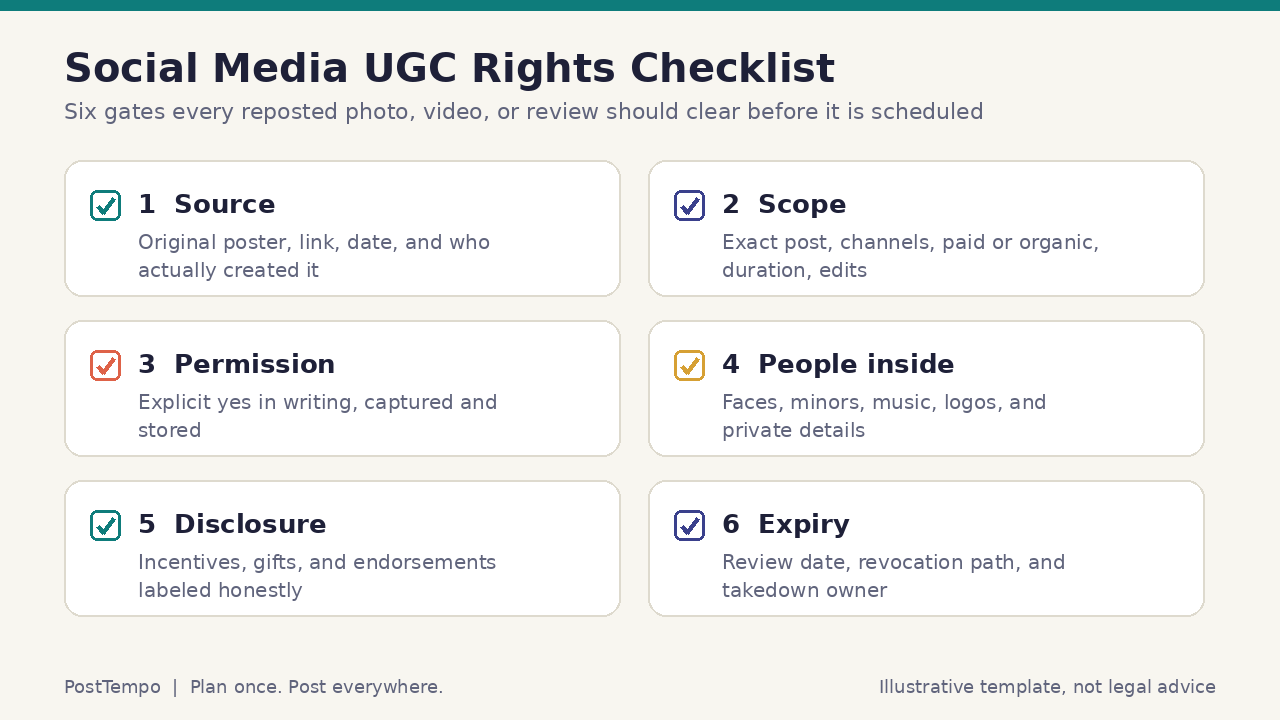
A social media UGC rights checklist is a practical routine for creators, agencies, and multi-location brands that want to repost customer photos, reviews, clips, and fan creations without guessing about permission. It should let a solo creator, community manager, account lead, or regional coordinator confirm who made an asset, what exactly that person agreed to, where and for how long it may be used, what else appears inside it, what must be disclosed, and who removes it if the answer changes.
Free tool
Find your best posting time
Get a personalized weekly plan in about 60 seconds. No signup needed to see your schedule.
Try the free plannerThis guide treats UGC rights as an operations workflow, not a legal opinion and not a growth promise. It does not claim that user-generated content will increase reach, engagement, conversion, ranking, or revenue, and it does not invent statistics about how often brands get permissions wrong. It draws on public guidance from the U.S. Copyright Office and the Federal Trade Commission and on published platform terms, and it points you to qualified counsel for contracts, releases, and disputes.
You can use it for a creator's weekly follower spotlight, an agency's client clearance process, or a regional brand where local managers reshare customer posts. Start small: one request template, one rights log, one stop rule, and one person who owns removals. PostTempo's approach stays the same across channels: Plan once. Post everywhere.
Ownership, Licenses, and Platform Features: Know What You Are Asking For
Start with the basic idea that sits under every UGC decision. In the United States, the U.S. Copyright Office explains that copyright protection exists from the moment an original work is created and fixed in a tangible form, and that registration is generally voluntary. A customer who snaps a photo of your product and posts it usually owns the copyright in that photo the moment they take it. Your brand appearing in the frame does not transfer that ownership to you.
Copyright Basics (Circular 1) lists the owner's exclusive rights, including the rights to reproduce the work, prepare derivative works, distribute copies, and display the work publicly, along with the right to authorize others to do those things. The same circular notes that owning a copy of a work does not make you the owner of the copyright, that a transfer of ownership generally must be in writing and signed, and that transferring a right on a nonexclusive basis does not require a written agreement. For social teams, the practical lesson is simple: what you usually need is permission, often a nonexclusive license for a defined use, and the safest way to prove that permission is to capture it in writing even where the law might not strictly demand a signature.
Platform terms are a frequent source of confusion. When people post on a social platform, they typically grant that platform a license so it can host, display, and distribute their content. TikTok's Terms of Service, for example, describe a license that users grant to TikTok to operate and provide the platform, state that users retain the right to use their content elsewhere, and ask users to confirm they hold the rights needed for what they post. That license runs to the platform. It is not a license to your brand to download a customer's video and publish it on your website, your other social accounts, or in an ad.
Native sharing features are different from downloading and reposting. Using a platform's built-in share, stitch, duet, quote, or embed feature generally keeps the content attributed and inside the rules the platform set for that feature. Downloading the file, removing the original context, and uploading it to your own account is a new use that should go through your permission gate. When in doubt, treat a native share as a lighter decision and a download as a full rights decision.
Paying for content does not automatically make it yours either. The Copyright Office's Works Made for Hire (Circular 30) explains that a work made for hire is either prepared by an employee within the scope of employment or specially ordered or commissioned in certain listed categories when both parties expressly agree in a signed written instrument. A customer who posts a photo is not your employee, and even content you commission from a freelancer or creator may remain theirs unless your written agreement says otherwise. For UGC, assume the creator owns the asset and that you are asking for a license.
Fair use is not a workflow. The Copyright Office maintains a Fair Use Index of court decisions precisely because fair use is decided case by case on specific facts. A marketing repost of someone's photo to promote your products is not something to rely on fair use for as a routine plan. If a team member wants to argue fair use for a specific asset, that is a signal to ask qualified counsel or, more often, simply to ask the creator.
- The person who created the photo or video usually owns it from the moment of creation
- Your product appearing in the frame does not give you rights to the image
- Platform terms license content to the platform, not to other brands
- Native share or embed features are lighter decisions than downloading and reuploading
- Fair use is fact specific; do not build a routine on it
- Prefer a written, specific, nonexclusive permission you can show later
References and related guides
The Permission Request: How to Ask, What to Say, and Where to Keep the Yes
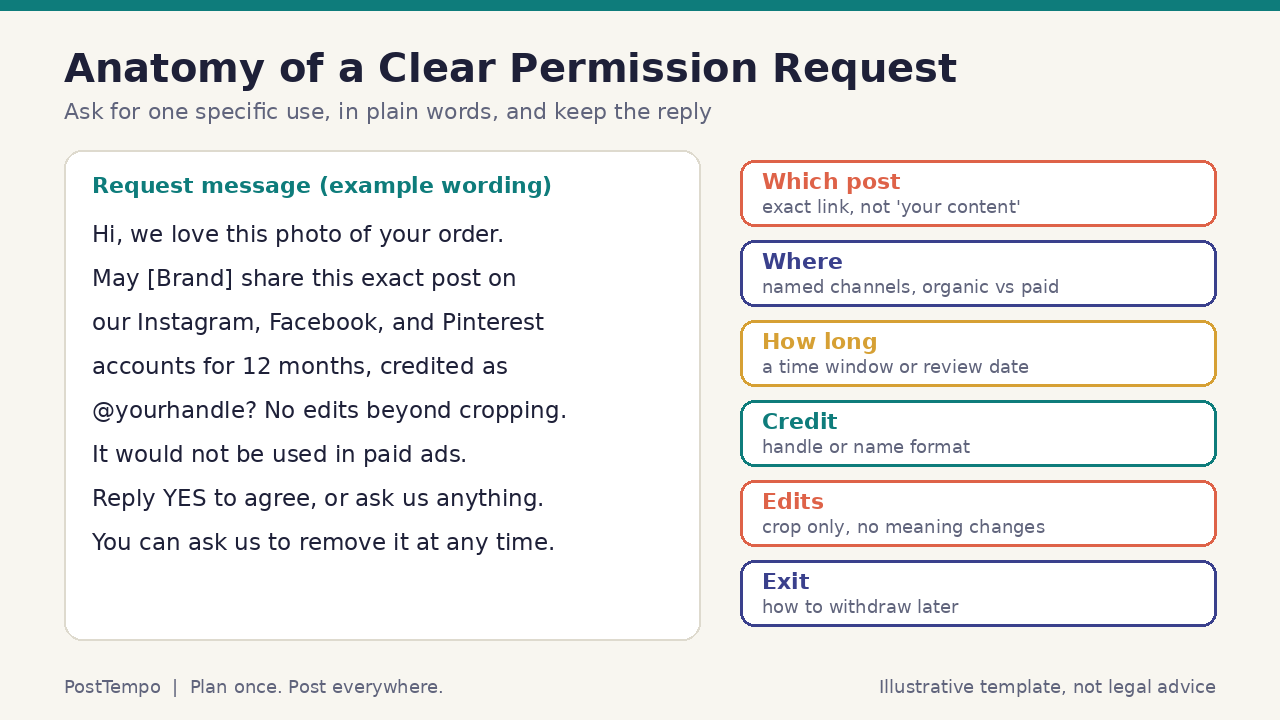
A good permission request is specific, friendly, and easy to answer. Vague wording such as "can we use your content?" creates arguments later because nobody agreed on what "use" meant. Name the exact post with a link, the channels where it will appear, whether it will be organic only or also used in paid placements, how long you plan to use it, how you will credit the creator, what edits you will make, and how they can ask you to stop. Then ask for a clear reply, such as a typed yes.
Where you ask matters less than whether you keep the answer. Some teams reply publicly on the original post so the request and the yes are visible together. Others send a direct message to keep the conversation private. Either can work. What does not work is a yes that lives only in a coordinator's personal inbox or memory. Capture a screenshot or export that shows the request, the reply, the handle, and the date, and store it where the next person on the team can find it in the rights log.
Branded hashtag terms deserve caution. Some brands publish a notice saying that anyone who uses a campaign hashtag agrees to let the brand reuse their posts. A notice like that may help set expectations, but many people who use a hashtag never read the terms page, and a hashtag alone is weak evidence that a specific person agreed to a specific commercial use. Treat a hashtag as a discovery tool and a reason to ask, not as permission by itself.
Paid, edited, or high-visibility uses need more than a quick DM. If a customer's photo will run as an ad, appear on packaging or in print, be edited in a way that changes what it shows, or stay in use for a long time, move to a short written release that the creator signs or accepts, and involve whoever handles contracts for your business. If the creator is paid or receives something of value for the use, the arrangement starts to look like a creator partnership, and your influencer briefing and disclosure practices apply.
Make declining easy. Say plainly that saying no is fine, and honor it. A respectful process protects relationships with your community, which matters more than any single asset.
- Link the exact post; never ask for "your content" in general
- Name channels, organic or paid, duration, credit, and edits
- Ask for a clear typed yes and capture it with handle and date
- Treat branded hashtags as discovery, not as consent
- Use a signed or accepted release for ads, print, edits, or long terms
- Tell people that declining is fine, and honor a no
References and related guides
What Else Is Inside the Post: People, Minors, Music, Logos, and Private Details
The person who posted an asset may not control everything that appears in it. A photo can include friends, strangers in the background, children, artwork on a wall, another company's logo, a license plate, or a home address on a package label. A short video can include a song, a voiceover from someone else, or footage the poster reshared from another account. Your checklist should look inside the asset, not only at the account that posted it.
People in the frame raise their own questions. Many U.S. states recognize rights over commercial use of a person's name or likeness, and the rules differ by state and by country. For organic reposts of a customer's own selfie, the creator's permission usually covers their own appearance. For anyone else who is clearly identifiable, especially in a paid ad, ask whether the creator can confirm those people agreed, or choose a different asset. When the use is commercial and the person is recognizable, err on the side of a separate release or a different image.
Minors need extra care. If a child is identifiable, get permission from a parent or guardian, avoid sharing names, schools, or locations, and consider whether the asset is worth the risk at all. Many teams simply set a rule that identifiable minors are not used in UGC reposts or ads without a guardian's written release.
Music and audio are common traps. Sounds added through a platform's in-app library are typically provided for use on that platform, and TikTok's terms note that users are responsible for rights in music they use that was not selected from its music library. If you download a clip and reuse it elsewhere, the audio may not come with it. Strip or replace audio you cannot clear, or keep the share native to the platform where the sound is licensed.
Finally, scan for private details and third-party marks. Blur or crop out addresses, order numbers, faces of bystanders, and screens with personal data. If another brand's logo dominates the frame, consider whether reposting implies a relationship that does not exist. Accessibility also belongs here: when you repost, write meaningful alt text and keep any captions accurate to what the creator said.
- Look inside the asset: people, children, art, logos, labels, and screens
- Recognizable people in commercial uses may need their own permission
- Set a firm rule for identifiable minors and guardian releases
- Do not assume in-app music travels with a downloaded clip
- Crop or blur private details before reposting
- Add accurate alt text and captions when you share
References and related guides
Disclosure and Honest Use: Incentives, Endorsements, and Edits
Rights are only half of responsible UGC. The other half is honesty with your audience. The Federal Trade Commission's guidance on endorsements explains that if there is a connection between an endorser and a marketer that consumers would not expect and that would affect how they evaluate the endorsement, the connection should be disclosed clearly and conspicuously. That includes payment and also free or discounted products, gift cards, contest entries, and other things of value.
For UGC, this shows up in a few predictable places. If you sent a customer a free product and they posted about it, and you now feature that post, the relationship matters. If you ran a contest where people entered by posting with a hashtag, the FTC staff guidance notes that a hashtag such as a brand name plus "Rocks" would not tell viewers the post was incentivized, while including a word like contest or sweepstakes in the hashtag should be enough, and participants should be told where to place it. If you tell customers in advance that their comments might be featured in your advertising, the FTC staff guidance suggests that fact may need to be disclosed in the ad.
Disclosures should be easy to notice. FTC staff guidance for influencers advises placing disclosures with the endorsement itself rather than only on a profile page or behind a "more" link, using simple words like "ad" or "sponsored," and not relying on a platform's disclosure tool as the only signal. When you repost incentivized content, carry the disclosure forward in your caption or on the image so it travels with the asset.
Edits must not change meaning. Cropping for format is ordinary. Rewriting a review, removing a sentence that adds an important caveat, or combining clips so that a customer appears to say something they did not say is not. The FTC staff guidance also states that an endorsement must reflect the honest opinions and experiences of the endorser. If a customer's experience was with an older version of a product, do not present it as a review of the current one.
Keep selection honest too. Featuring happy customers is normal marketing. Fabricating reviews, writing posts and attributing them to customers, or presenting staff or relatives as ordinary customers without saying so is not. If employees create content about your products, the employee relationship should be disclosed, and the employee advocacy playbook covers how to handle that.
- Disclose material connections such as gifts, payments, discounts, or contest entries
- Use clear contest or sweepstakes wording, not a vague brand hashtag
- Place disclosures with the content, not only on a profile or behind a link
- Crop for format; never edit to change what someone said or showed
- Do not present old experiences as reviews of current products
- Disclose employee and family relationships when they post
References and related guides
Rights Log Fields: The Template You Can Copy
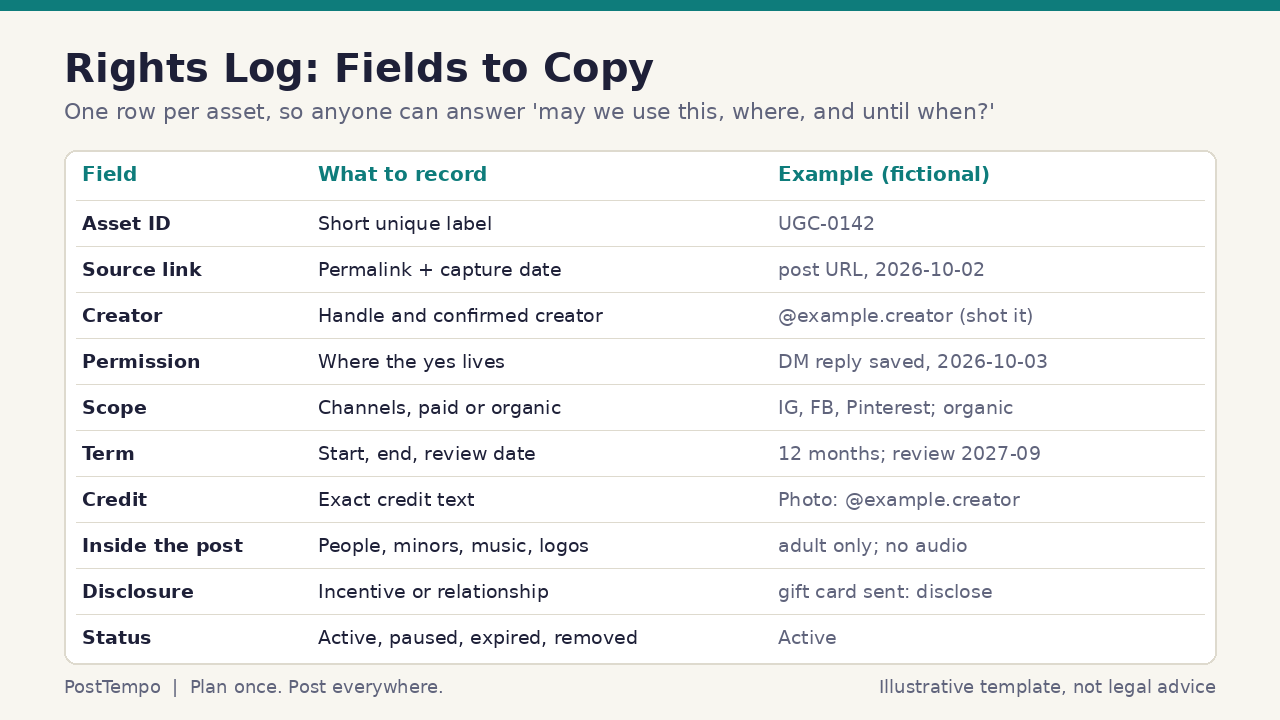
The rights log is the working heart of the checklist. It can live in a spreadsheet, a shared database, or a document table, as long as every reused asset gets one row and everyone uses the same fields. The test of a good log is that a new teammate, a client, or a future you can answer three questions in under a minute: may we use this asset, where may we use it, and until when.
Recommended fields: an asset ID; the source link and the date you captured it; the creator's handle and a note confirming they are the person who made it; the location of the permission evidence, such as a saved screenshot of the reply; the scope, listing channels and whether paid use is allowed; the term, with a start date, end date, and review date; the exact credit text; a short note on what appears inside the asset, including people, minors, music, and logos; the disclosure decision; the internal approver; and a status of active, paused, expired, or removed.
Add two optional fields if you work with clients or locations: the client or location the asset belongs to, and any restriction the client set, such as no paid use for a regulated product line. Agencies should keep each client's rights log separate, or at least filterable, so permissions never leak from one account to another.
Keep evidence durable. Posts get deleted, accounts change handles, and DMs can disappear. Save the permission evidence as a file or export inside your own storage the day you receive it, and note the original handle even if it changes later. If an account goes private or disappears, mark the row paused until you decide whether the permission you captured still covers the planned use.
Do not fill the log with guesses. If you do not know who shot a photo, write unknown and treat the row as not cleared. The log should show what you know, not what you hope.
- Asset ID, source link, capture date
- Creator handle and confirmation that they made it
- Permission evidence location and date
- Scope: channels, paid or organic, edits allowed
- Term: start, end, review date; credit text
- Inside the asset: people, minors, music, logos
- Disclosure decision, approver, and status
Workflow: Find, Ask, Verify, Record, Schedule, and Review
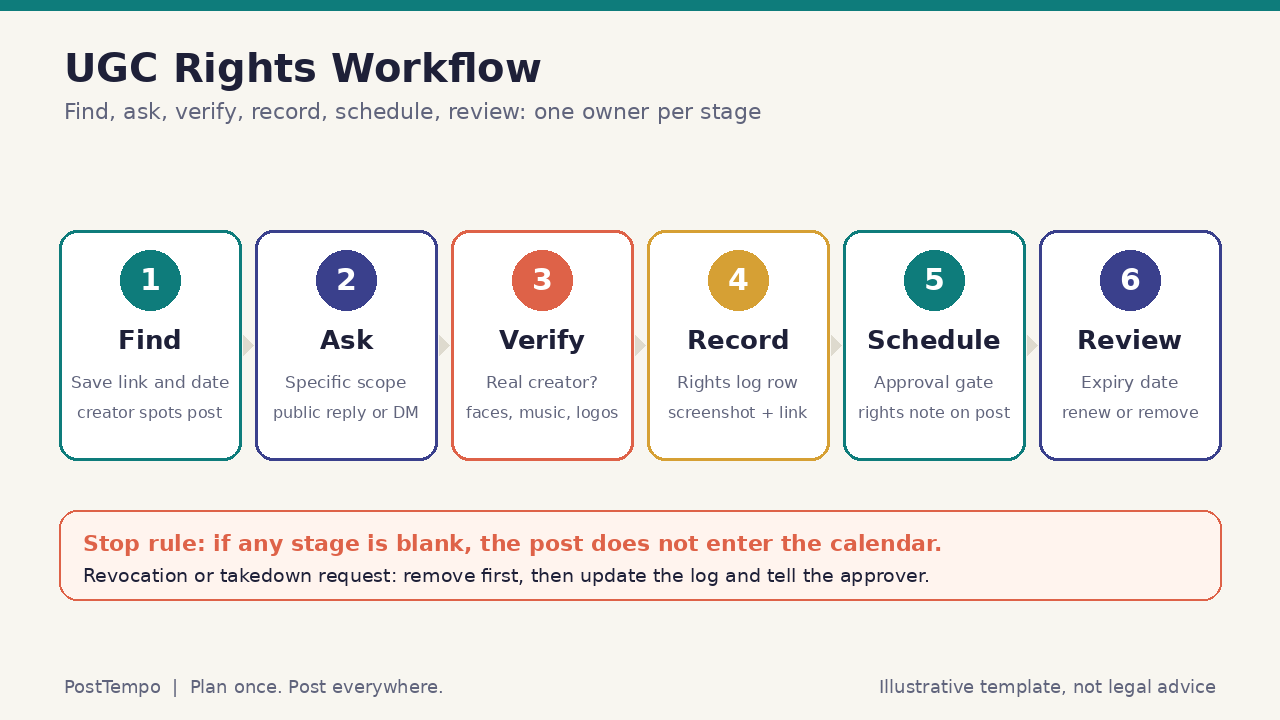
A checklist works best when it is wired into the way content already moves. A practical sequence has six stages, each with an owner. Find: whoever spots the post saves the link and date and adds a draft row to the rights log. Ask: the community or social owner sends the specific permission request. Verify: a second person checks that the poster is the real creator and reviews what is inside the asset. Record: the permission evidence, scope, term, credit, and disclosure decision go into the log. Schedule: the post enters the calendar only with a rights note attached. Review: someone owns the expiry date and the renewal or removal decision.
The stop rule keeps the process honest. If any stage is blank, the post does not enter the calendar. This is easier to enforce when your approval step includes one question for every UGC post: is there an active rights log row that covers this exact channel and use? Approvers should be able to say no without debate when the answer is missing.
In PostTempo, teams can plan posts on a shared calendar, route drafts through approval before they are scheduled, and publish to LinkedIn, Bluesky, TikTok, Instagram, Facebook, Threads, X, and Pinterest from one place, with YouTube and Telegram coming next. That makes it practical to keep the rights note with the draft itself, so the reviewer sees the scope and credit text right next to the caption. PostTempo does not decide whether you have permission. Your rights log and your people do. The tool simply keeps the decision visible at the moment it matters.
Watch the scope when one asset fans out across channels. A creator who agreed to an Instagram and Facebook repost has not agreed to Pinterest, TikTok, or an ad. Before you duplicate a UGC post to more networks, compare the destination list with the scope field in the log. Plan once. Post everywhere, but only everywhere the creator said yes to.
Set calendar reminders for review dates. A recurring monthly check of rows expiring in the next thirty days is enough for most teams. Renew with a fresh request if you still want to use the asset, or retire it and record the removal.
- Six stages with one owner each: find, ask, verify, record, schedule, review
- Stop rule: no rights row, no calendar slot
- Approvers check scope against the exact channels selected
- Keep the rights note attached to the draft for reviewers
- Compare destination networks with the permission scope before duplicating
- Monthly check of upcoming expiry dates
References and related guides
Takedown Requests, Revocations, and Expiring Permissions
Even with perfect records, people change their minds, relationships end, and terms expire. Your checklist should include a short, calm path for removal. When a creator asks you to take down their content, the default response is to remove it promptly from your organic channels, pause any ads that use it, thank them, and update the rights log with the date and reason. Arguing over whether your original permission technically still applies rarely helps your reputation.
Some requests arrive formally. Copyright owners can send notices through platform reporting tools, and in the United States there is a notice and takedown framework for online service providers. If you receive a formal notice or a demand letter, route it to whoever handles legal matters for your business right away rather than replying from the social account. If the notice concerns content you believe you had permission to use, your rights log row and saved evidence are exactly what that person will need.
Plan for the less obvious cases. If an asset appears in scheduled posts, the removal owner must check the calendar and queue as well as live posts. If an asset has been repurposed into a carousel, a compilation video, or a blog image, each derivative needs to be found and removed. A single asset ID used everywhere makes that search possible.
Expiry deserves the same care as revocation. When a term ends, stop new uses on the end date. Decide in advance whether older organic posts may remain on your feed or must be archived, and write that decision into your standard request wording so creators know what to expect.
Escalate anything that looks like a crisis. If a removal request comes with public accusations, safety concerns, or harassment, follow your crisis response plan and your comment moderation workflow rather than improvising in public replies.
- Default to prompt removal, a thank you, and a log update
- Route formal notices and demand letters to whoever handles legal matters
- Check scheduled posts and queues, not only live posts
- Find derivatives through a shared asset ID
- Stop new uses on the expiry date and state what happens to old posts
- Use crisis and moderation playbooks for public disputes
References and related guides
Scenario One: Priya Nair Features Follower Projects as a Solo Creator
Illustrative scenario: Priya Nair is a fictional independent creator who sells knitting patterns and posts short tutorials. Followers often share photos of finished projects made from her patterns and tag her. Priya wants a weekly "maker spotlight" carousel featuring those projects, and she occasionally wants to use one in a small paid promotion for a new pattern.
Priya keeps a simple rights log in a spreadsheet with the core fields and a column for whether paid use is allowed. When she finds a project photo she likes, she replies to the post with a short, specific request: the spotlight carousel on Instagram and Pinterest, credited by handle, cropped for format, with removal any time on request. She screenshots the yes and saves it to a folder named with the asset ID.
She splits her checklist into two paths. Organic spotlights need the specific yes, a check that the photo shows only the maker's own hands and work, and accurate alt text describing the project. Paid use needs a separate request that says the image will appear in an ad for a limited period, and Priya only runs paid promotions with photos where the maker gave that extra yes. When she sends free patterns to testers, she asks them to say so in their posts and carries that disclosure forward when she features those projects.
In one illustrative month, Priya features several projects, gets one polite decline, and receives one removal request after a maker decides to close her account. Priya removes the image the same day, updates the row to removed, and checks that no scheduled carousel still includes it. The point of her process is not volume. It is a spotlight series that makers trust.
- Specific public reply requests with a screenshot of each yes
- Separate yes required for paid promotion
- Only the maker's own hands and work in featured photos
- Tester disclosures carried forward when featured
- Same-day removal with a check of scheduled posts
References and related guides
Scenario Three: Cedar & Crumb Bakeries Coordinates Local Reposts
Illustrative scenario: Cedar & Crumb Bakeries is a fictional regional bakery brand with several neighborhood locations. Customers post photos of cakes, pastries, and celebrations, and each location manager would like to reshare favorites on local accounts. A regional marketing coordinator wants consistency without slowing every repost down.
The coordinator creates a two-tier policy. Tier one covers native shares inside a platform's own share feature with credit intact; location managers may do these freely, following the community guidelines. Tier two covers anything downloaded, edited, moved to another channel, or used in a promotion; these require a specific permission request using the regional wording, a rights log row, and the coordinator's approval in the shared calendar.
Because celebration photos often include children and guests, the policy says that identifiable minors are not used in tier two posts without a guardian's written release, and that bystanders are cropped or the photo is skipped. Managers are reminded not to repost images that show order slips, addresses, or names on cake toppers without the customer's agreement. If a location offered a discount for posting, the repost carries a clear disclosure.
Each quarter the coordinator reviews the regional rights log, retires expired rows, and shares a short summary with location managers covering what went well and which assets need renewal. When a customer asks one location to take a photo down, the manager removes it, tells the coordinator, and the coordinator checks the other locations' calendars for the same asset ID.
- Two tiers: free native shares, gated downloads and promotions
- Regional request wording and a single rights log
- Firm minors rule and bystander cropping
- Private details removed; discounts disclosed
- Quarterly review and cross-location takedown checks
References and related guides
Connect the Checklist to Briefs, Approvals, Repurposing, Accessibility, and Reporting
A UGC rights checklist should not be a separate island. Link it from your campaign brief template so any campaign that invites customer content states the scope and disclosure plan before launch. Reference it in your content approval process so approvers know that every UGC draft needs an active rights row. Add a line to your content review checklist that asks whether the credit text, disclosure, and alt text match the log.
When you repurpose content across formats, the content repurposing workflow should treat UGC differently from your own material: each new format and channel must fall within the creator's permission. When accounts change hands, the account handoff checklist should include the rights log and its evidence folder, because a new team cannot honor permissions it cannot find.
Reporting closes the loop. Your monthly reporting template can include a short UGC section listing assets used, channels, renewals due, and removals completed. Keep it factual. Do not claim that UGC outperformed other content unless you measured it on your own accounts with a method you can explain, and even then describe it as your result for that period rather than a general rule.
- Campaign briefs state UGC scope and disclosure plans
- Approvers check for an active rights row on every UGC draft
- Repurposing respects each creator's channel scope
- Handoffs include the rights log and evidence folder
- Monthly reports list usage, renewals, and removals factually
References and related guides
A Beginner-Friendly UGC Rights Checklist
Use this checklist to stand up a first version in one working session. Print it, paste it into your team wiki, or add it as a required step in your approval flow. You can expand it later. A short checklist that everyone actually uses is better than a long policy that nobody opens.
Run it in order for every asset that started in someone else's account, and stop at the first unanswered item.
- Save the source link and capture date, and start a rights log row
- Confirm the poster is the person who created the asset
- Decide whether a native share is enough or whether you need to download or edit
- Send a specific request naming the post, channels, paid or organic use, term, credit, edits, and how to withdraw
- Capture the typed yes with handle and date in your own storage
- Check for identifiable people, minors, music, third-party logos, and private details
- Decide on disclosure for gifts, payments, discounts, contests, or employee relationships
- Write accurate alt text and keep captions true to what the creator said
- Attach the rights note to the draft and get approval before scheduling
- Set a review date and name the person who handles removals
References and related guides
Editorial Methodology and Professional Limits
This article was prepared by the PostTempo Editorial Team for creators and social teams who need a practical UGC permissions routine. It draws on public guidance from the U.S. Copyright Office and the Federal Trade Commission, published platform terms, and PostTempo's own product workflows for calendar planning, approvals, scheduling, and publishing status. It does not present original legal research, paid studies, or confidential client results.
This guide is not legal advice. Copyright, publicity, privacy, consumer protection, and advertising rules differ by country and by U.S. state, and they change. Contracts, releases, formal notices, and disputes should go to a qualified attorney. If you operate outside the United States, local law may differ significantly from the U.S. sources cited here.
Illustrative scenarios use fictional people and businesses. They are teaching devices, not testimonials, case studies, or performance claims. No statement in this guide should be read as a promise that UGC will improve reach, engagement, conversion, ranking, or revenue. If you use an AI assistant to draft permission requests or log entries, review every message yourself before sending, and never let a tool decide that permission exists.
- Operational education grounded in public sources and product workflows
- Not legal advice; involve counsel for releases, notices, and disputes
- Fictional scenarios only, never testimonials or performance claims
- Re-verify primary sources because rules and terms change
References and related guides
Frequently Asked Questions
What is a social media UGC rights checklist?
It is a short set of gates you run before reposting, editing, or advertising with content someone else created. It confirms the original creator, captures a specific permission, checks people, minors, music, and logos inside the asset, decides on disclosure, records everything in a rights log, and sets a review date and removal owner. It is an operations tool, not legal advice.
Does tagging my brand or using my hashtag give me permission to repost?
Not by itself. A tag or branded hashtag shows that someone posted about you, but it does not clearly show that they agreed to a specific use such as an ad, your website, or another channel. Treat tags and hashtags as a reason to ask, then capture an explicit yes that names the post and the intended use.
Is sharing with a platform's built-in share or repost feature different from downloading and reposting?
Generally yes. Native share, quote, stitch, duet, and embed features keep attribution and operate under the rules the platform set for those features. Downloading the file and uploading it to your own account or another channel is a new use, so run it through your full permission gate.
Do I need a signed contract for every repost?
Many teams use a captured typed yes for simple organic reposts and move to a signed or accepted release for paid ads, print, significant edits, long terms, or anything involving minors. The U.S. Copyright Office notes that transfers of ownership generally require a signed writing while nonexclusive licenses may not, but a written record is still the best way to show what was agreed. Ask a qualified attorney about your specific situation.
When do I need to disclose that reposted UGC was incentivized?
FTC guidance says material connections that consumers would not expect, such as payment, free or discounted products, gift cards, or contest entries, should be disclosed clearly and conspicuously. When you feature incentivized content, carry a clear disclosure with the post itself, and for contests use wording such as contest or sweepstakes rather than a vague brand hashtag.
What should I do if a creator asks me to remove their content?
Remove it promptly from organic posts, pause any ads using it, check scheduled posts and repurposed versions, thank the creator, and update the rights log with the date and reason. Route formal copyright notices or demand letters to whoever handles legal matters for your business instead of replying from the social account.
Sources
- U.S. Copyright Office: Copyright in General (FAQ)
- U.S. Copyright Office: Copyright Basics (Circular 1)
- U.S. Copyright Office: Works Made for Hire (Circular 30)
- U.S. Copyright Office: Fair Use Index
- Federal Trade Commission: FTC's Endorsement Guides: What People Are Asking
- Federal Trade Commission: Disclosures 101 for Social Media Influencers
- TikTok Terms of Service (U.S.)
Weekly Rhythm Report
One chart. One tactic. Every Sunday.
The best posting window of the week, one platform breakdown, and one growth tactic. Read in 90 seconds.
No spam. Unsubscribe anytime.